Help Your Community Explore Energy-Efficiency Improvements Before You Decide
“Make energy efficiency part of every society meeting.”
Every Society Has Shared Spaces That Could Perform Better.
Discover where to start with RetroAI.
AI-assisted building assessments. Visual improvement concepts. Clearer committee decisions.
A society may look well maintained and still have opportunities to improve thermal comfort, reduce common-area energy use and become more sustainable.
For RWA office-bearers and managing committees, spotting those opportunities is only the first step. Explaining them to residents, agreeing priorities and deciding what to investigate within a shared budget can take months.
RetroAI brings these steps together in an AI-powered assessment platform informed by national building standards and green-building criteria such as IGBC, GRIHA and EDGE.
Explore potential improvements through structured recommendations, indicative sustainability assessments and AI-generated visualisations, so your committee can move from What could we improve? to What should we look into first?
Because better decisions are easier when everyone can see the options.
The Challenge Is Not Just Improving the Society. It Is Agreeing Where to Start.
Housing societies are increasingly expected to manage rising electricity costs, summer heat and sustainability goals, often with limited budgets and many opinions.
- Finding the opportunity. Heat gain through roofs, terraces, walls and windows, missing shade, and inefficient lighting or cooling equipment may contribute to avoidable energy use.
- Explaining it to residents. Members may struggle to see why a particular improvement matters or what it would look like in their own society.
- Prioritising within a shared budget. Several improvements may be possible, but their cost, suitability and expected benefits differ.
- Building agreement. Decisions move faster when the committee and members can look at the same problem and discuss the same options.
RetroAI helps your society explore these questions before committing to any spending.
Meet RetroAI: Building Intelligence for Better Community Decisions
RetroAI converts building photographs and questionnaire responses into a preliminary assessment of potential energy-efficiency improvements. Instead of a long list of disconnected suggestions, you get a structured view of the building, possible measures and what to investigate further.
- Assess
Identify potential heat-gain and energy-use issues using photographs and information about your society. - Visualise
See AI-generated concepts of how selected improvements could change the look of a terrace, façade or shared space. - Prioritise
Review preliminary recommendations, indicative costs where available, and an indicative sustainability score (Premium). - Plan
Use the four-phase action plan to decide what to explore first, what needs professional advice and what may fit your budget.
From Building Photograph to Committee Discussion
- Start with Your Society
Create a login on the web app or the Android app. One committee member or facility manager then answers a short questionnaire and uploads photographs of the building, such as the exterior, terrace or a common area. Free reports use 2 photographs. - Explore the Assessment
RetroAI analyses the information to identify potential opportunities relating to heat gain, the building envelope, common-area energy use and other sustainability considerations. - See the Possibilities
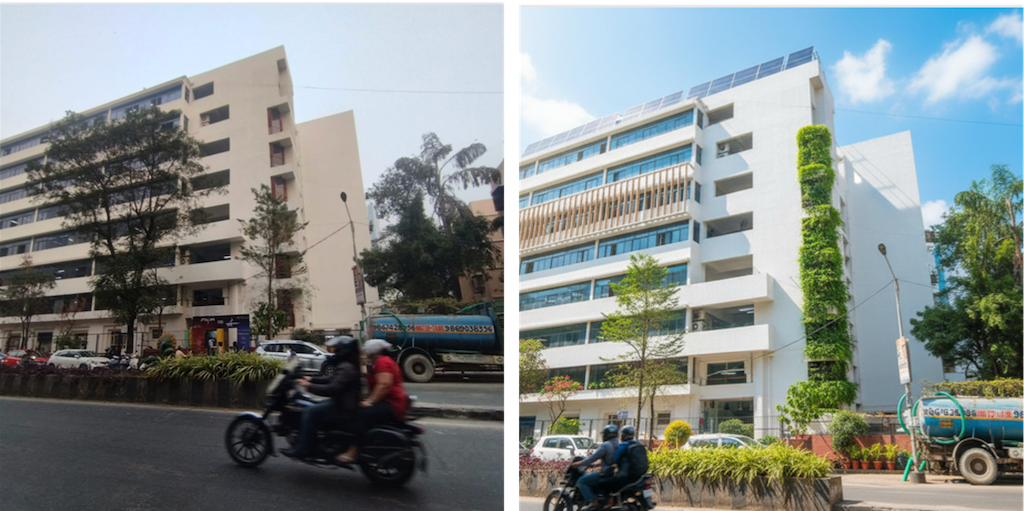
Review AI-generated visualisations next to the original photographs. Concepts may include shading, reflective roof surfaces, greenery and rooftop solar, where appropriate. Premium reports include up to 10 before-and-after images. - Take It to the Committee
Use the report in managing-committee or general-body discussions. Shortlist the measures worth investigating, and identify which ones need a professional opinion before any decision. Your report stays in your dashboard for the next meeting.
The result: a visual, structured starting point that everyone in the society can discuss.
What Can Your Society Explore with RetroAI?
- Roofs, Terraces and Building Envelope
Look at potential opportunities across roof and terrace surfaces, external walls, glazing, shading and ventilation, and identify which features need closer investigation. This is often where top-floor residents feel the heat most. - Common-Area Energy Use
Review preliminary suggestions on lighting, cooling equipment and other shared facilities that may influence your society’s electricity bill. - Solar and Renewable Energy
Consider the potential relevance of rooftop solar and other renewable-energy measures, subject to site suitability, society approval and technical assessment. - Water and Green Infrastructure
Consider opportunities involving rainwater harvesting, greenery and related interventions where relevant. - Sustainability Assessment
Review an indicative sustainability score and the opportunities identified. Use these to guide further investigation, not as a certification. The score is included in Premium reports.
Recommendations vary according to the property, the information supplied and the assessment’s capabilities.
A Visual Plan Helps Everyone Agree
Technical descriptions rarely persuade a general body. AI-generated visualisations let members compare an original photograph with an improved concept, and then review the recommendations behind it.
Keep Every Assessment in One Place
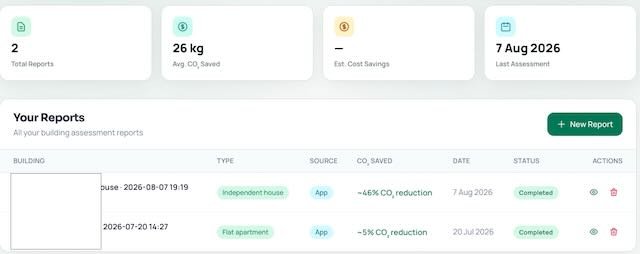
Once you create your login, every analysis you complete is saved to your RetroAI dashboard, so you can see all your society’s projects in one place. Create the login with a society email address if you’d like to share it with other members.
- All your projects together
See every building, tower or shared area you have assessed. - Revisit and compare
Return to earlier assessments and review the recommendations. A free login can generate up to three reports, enough to compare a few buildings or areas. - Free and Premium access
Free reports are limited and show the top three AI recommendations. The full report, the sustainability score and PDF or Excel downloads need a paid Premium plan.
Built for the Way Societies Work
- Office-Bearers and Managing Committees
Bring energy efficiency into society meetings with visual concepts and preliminary recommendations. Identify what needs technical validation before any proposal goes to members. - Residents and Members
Understand what is proposed, why it matters and what it could look like, before voting or contributing to a shared cost. - Facility and Maintenance Teams
Use the assessment to organise common-area improvement ideas and decide where to request a detailed audit or vendor quote. - Societies Working with Architects or Consultants
Bring the report to your architect, builder or energy auditor as a starting point, so conversations begin with shared information.
More Than a Score. A Starting Point for Action.
An assessment is valuable when it helps your society decide what to investigate next.
Understand the opportunity. Explore the options. Validate the solution.
To begin, use RetroAI to help your committee have a more informed conversation about how your society could perform better.
Explore a Pilot with Your Society
We are inviting RWAs and housing societies to explore RetroAI and help shape how it supports community decisions.
A pilot can show how the platform fits into your committee’s process, which recommendations and visualisations are most useful, and where more technical validation is needed.
“Because every community deserves to be energy efficient.”
Coming Next
We are working towards helping societies connect with qualified retrofit professionals and suppliers, so that the step from assessment to action becomes easier.
Simple, Transparent Pricing
Start free, and upgrade only if you want the full picture. All prices are in INR.
Free: ₹0
For societies exploring their options.
- Up to 3 limited reports (web or Android app)
- 2 photographs per report
- Top 3 AI recommendations per report
- Limited report view in your dashboard
Premium: ₹399 per report (Most popular)
A complete analysis for a building or shared area.
- 1 complete building analysis
- All AI retrofit recommendations
- Indicative sustainability score
- IGBC / GRIHA / EDGE mapping
- 10 before-and-after images
- Energy and carbon calculations
- Full report in your dashboard
- Full PDF and Excel download
Assessing several towers or blocks? Each building is a separate report. For guidance, contact us at teamretroai@gmail.com.
Individual owner? See RetroAI for Homeowners.
Architect or builder? See RetroAI for Architects and Builders.
Plans are subject to the Terms of Service and Refund Policy.
Frequently Asked Questions
1. Is RetroAI a replacement for an energy audit?
No. RetroAI provides AI-assisted preliminary assessments. Detailed energy audits, engineering calculations, structural assessments and compliance checks should be carried out by qualified professionals when required.
2. Can RetroAI guarantee savings on our electricity bill?
No. Energy-saving and carbon-reduction estimates are indicative. Actual outcomes depend on the building, climate, occupancy, equipment, selected interventions and implementation quality.
3. Where should our society start?
Start with the building or shared area that concerns you most, such as a tower with hot top floors or a clubhouse with high cooling costs. With a free login you can assess up to three buildings or areas before deciding whether to upgrade.
4. Who should upload the photographs?
Anyone in your society can. A committee member or facility manager can run the assessment for the society, and a resident or member can also do it on their own and take the report to the committee. Upload photographs of the building, such as the exterior, terrace and common spaces, and avoid including residents or personal details where possible. If your society wants all its assessments in one place, create the login with a society email address and share it with the people who need it. Handing it over when office-bearers change then only means passing on the email access.
5. Can several committee members use the same login?
No. Each login is for one user, and all the projects completed under it appear in that login’s dashboard. We suggest creating the login with a society email address, such as an office email, rather than a personal one, so the account can be handed over when office-bearers change. Paid members can download reports as PDF or Excel and share them with other committee members.
6. Are the before-and-after images actual completed projects?
No. The improved images are illustrative AI-generated concepts, unless separately documented as photographs of a completed project.
7. Does a RetroAI sustainability score represent IGBC or GRIHA certification?
No. An indicative platform assessment must not be represented as an official IGBC, GRIHA, EDGE or other certification. Formal certification requires the relevant programme’s own process.
8. How do we get started?
Create a login on the RetroAI web app or the Android app (there is no iPhone app yet). A free login can generate up to three limited reports, each with the top three AI recommendations. The full report, the sustainability score and PDF or Excel downloads need a Premium plan.
Better community decisions start here.
Your society already has opportunities to improve comfort, energy efficiency and sustainability. The first step is understanding where they are.
Discover the possibilities with RetroAI.
Important information: RetroAI provides preliminary AI-assisted assessments based on information supplied by users. Recommendations, sustainability scores, cost estimates, energy savings, carbon reductions and temperature-related projections are indicative, not guarantees of performance. AI-generated visualisations are conceptual. Technical feasibility, costs, applicable codes, structural safety, society approvals and expected performance must be independently assessed before implementation.